Online Sequence Diagram Tool
Online sequence diagram tool. A sequence diagram is a UML diagram that shows how objects, services, or actors interact over time. Export as SVG, PNG, or…
Sign up free — get 3 AI generations on the house.
Generate with AI — FreeExample outputs
Real diagrams our AI has produced from prompts like this one.
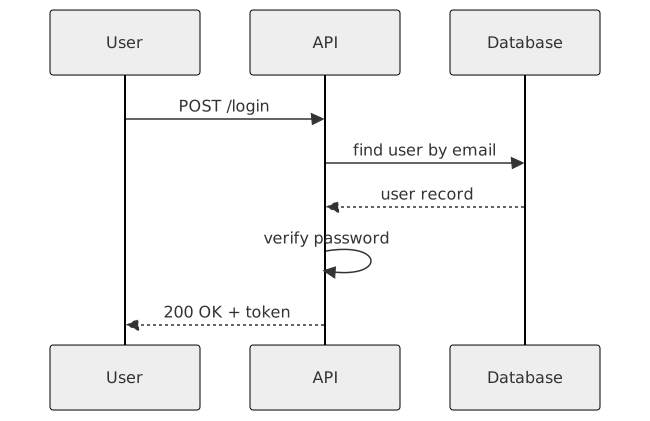
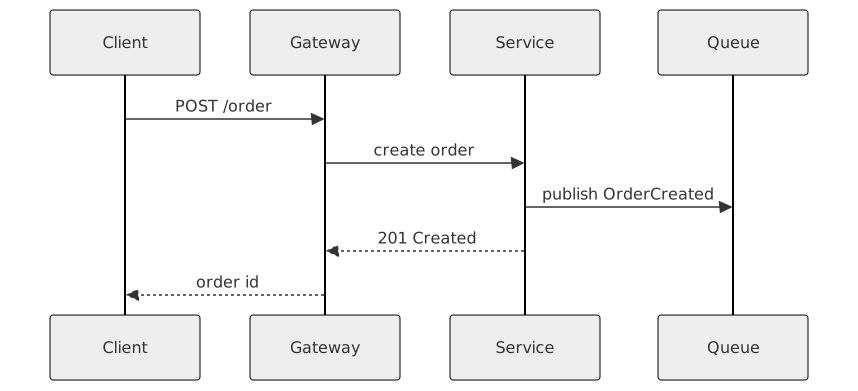
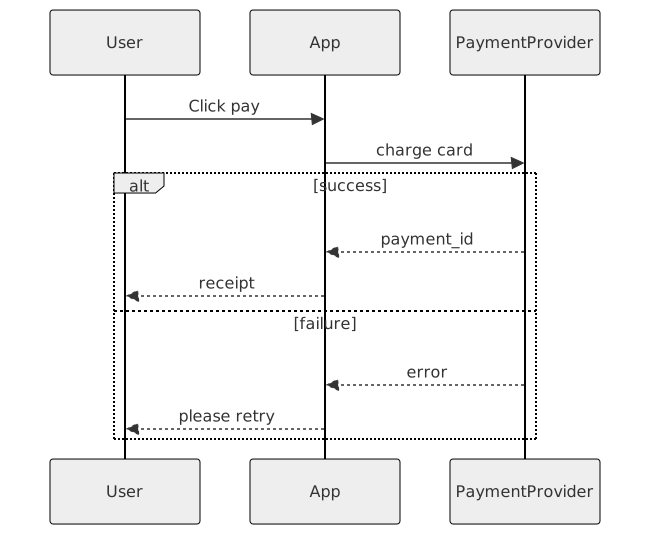
Online Sequence Diagram Tool turns a plain-English description into a sequence diagram you can export, share, or drop straight into your docs. No drawing tools, no syntax cheat-sheets — just describe what you need and get a clean Mermaid-compatible diagram back.
What is a sequence diagram?
A sequence diagram is a UML diagram that shows how objects, services, or actors interact over time. It lays out participants across the top and uses vertical lifelines with horizontal arrows to represent the messages they exchange, read top to bottom in chronological order.
Sequence diagrams are especially useful for documenting API calls, authentication flows, microservice choreography, and any scenario where the order of operations matters. Instead of describing an interaction in prose, a sequence diagram shows who calls whom, what they pass, and what comes back.
Who uses sequence diagrams?
- Backend and full-stack engineers designing APIs and service-to-service calls
- Software architects mapping out distributed systems and event flows
- Technical leads writing design docs and RFCs
- SREs and on-call engineers debugging cross-service incidents
- Security engineers reviewing authentication and authorisation flows
- Integration consultants explaining how two systems will talk to each other
- QA engineers writing end-to-end test scenarios
- Students and candidates studying for system design interviews
Why generate sequence diagrams with AI?
Sequence diagrams have a specific notation — solid arrows for synchronous calls, dashed for returns, activation bars for when a participant is busy. Getting this right by hand while also reasoning about a 15-step flow is slow, and the mental overhead is why most teams settle for bullet points instead.
Describing the flow in plain English and letting AI render the Mermaid source collapses the two tasks. You think about the interaction; the tool handles the notation. Swap a participant, reorder a call, or add an alt block by saying so — no YAML indentation wrestling required.
How to use the Online Sequence Diagram Tool
- Describe the interaction in plain English — who the actors are, what messages they send, and the order they happen in.
- Paste the description into the Online Sequence Diagram Tool prompt box and click Generate.
- Review the rendered diagram; ask for specific changes like "add an error path" or "show the database response explicitly".
- Export as SVG, PNG, or Mermaid source for your design doc, PR description, or wiki.
- Save it to your workspace so you can update it when the flow changes.
FAQ
Does it support alt/opt/loop blocks?
Yes. Mention them in plain English ('if the token is expired, refresh it and retry', 'loop until all pages fetched') and the generator will emit the right Mermaid alt/opt/loop syntax.
How many participants can a diagram have?
Mermaid handles 10+ participants, but diagrams get hard to read past 6 or 7. If you need more, consider splitting into two diagrams — one per sub-flow.
Can I export to PlantUML or other formats?
Native output is Mermaid. Mermaid source is easy to convert to PlantUML syntactically, and SVG/PNG export works everywhere.
Create your own with Online Sequence Diagram Tool — free
Sign up and get 3 AI generations on the house. Export to SVG, PNG, or share a public link.
Related AI diagram tools
Try another free generator from FlowCraft.
- Open tool
AI Sequence Diagram Generator
Generate sequence diagrams from plain English with AI. Free online tool that produces Mermaid-compatible sequence diagrams you can export and share.
- Open tool
AI Sequence Diagram Maker
AI sequence diagram maker. A sequence diagram is a UML diagram that shows how objects, services, or actors interact over time. Export as SVG, PNG, or Mermaid…
- Open tool
Free Sequence Diagram Maker
Free sequence diagram maker. A sequence diagram is a UML diagram that shows how objects, services, or actors interact over time. Export as SVG, PNG, or Mermaid…
- Open tool
AI Class Diagram Generator
Create UML class diagrams from plain English with AI. Free online class diagram generator with Mermaid-compatible output and SVG or PNG export.