AI Sequence Diagram Generator
Generate sequence diagrams from plain English with AI. Free online tool that produces Mermaid-compatible sequence diagrams you can export and share.
Sign up free — get 3 AI generations on the house.
Generate with AI — FreeExample outputs
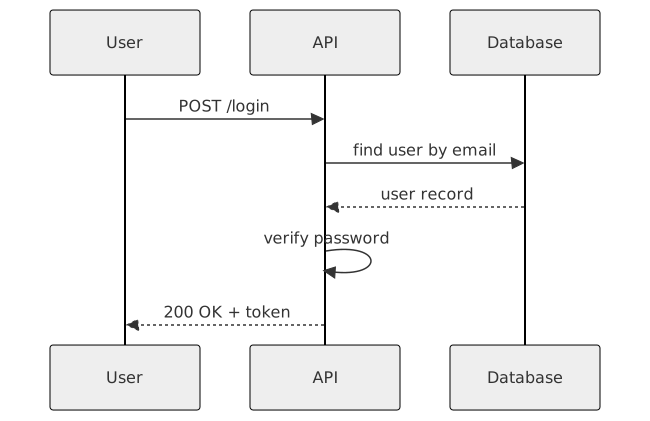
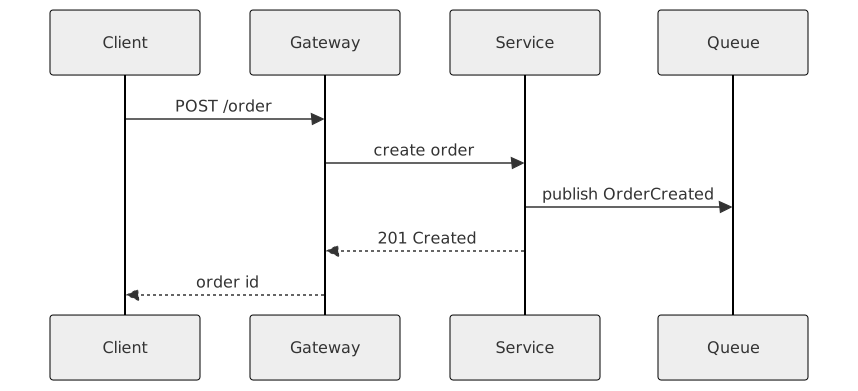
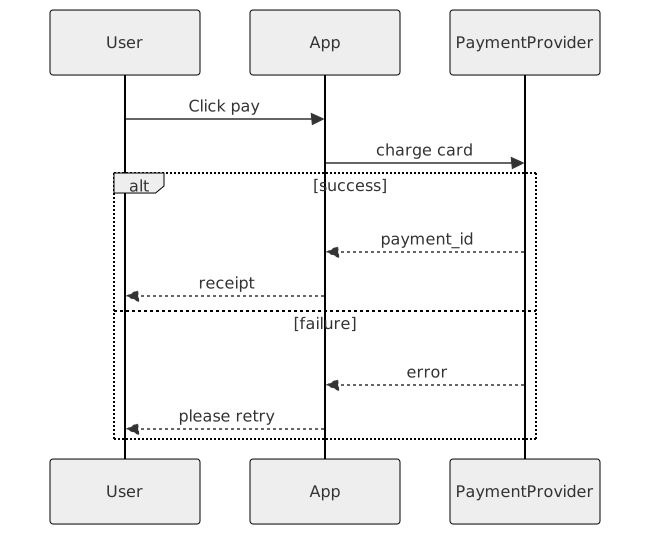
Real diagrams our AI has produced from prompts like this one.
What is a sequence diagram?
A sequence diagram is a UML diagram that shows how objects, services, or actors interact over time. It lays out participants across the top and uses vertical lifelines with horizontal arrows to represent the messages they exchange, usually read top to bottom in chronological order.
Sequence diagrams are especially useful for documenting API calls, authentication flows, microservice choreography, and any scenario where the order of operations matters. Instead of describing an interaction in prose, a sequence diagram shows who calls whom, what they pass, and what comes back.
Who uses sequence diagrams?
- Backend and full-stack engineers designing APIs and service-to-service calls
- Software architects mapping out distributed systems and event flows
- Technical leads writing design docs and RFCs
- QA engineers clarifying expected behavior for edge cases
- Product managers aligning teams on how a feature actually works end to end
- Developer relations and technical writers documenting SDKs and integrations
- Security engineers modeling authentication and authorization handshakes
Why generate sequence diagrams with AI?
The biggest hurdle with sequence diagrams is not the idea, it's the syntax. Whether you use UML, Mermaid, or PlantUML, you have to memorize arrow types, activation bars, and nesting rules before you can draw anything. That friction is why so many sequence diagrams live only as whiteboard photos that go stale within a sprint.
AI removes that barrier. You describe the interaction in plain English, and the model translates your intent into valid Mermaid syntax that renders immediately. You can iterate by editing your prompt, adding a new step, or asking for an error path, and the diagram updates without you touching the underlying code.
FlowCraft's AI is tuned for this kind of technical translation. It understands common patterns like request/response, async callbacks, retries, and third-party service hops, and it produces Mermaid-compatible output that you can further edit, export, or share with your team.
How to use the AI Sequence Diagram Generator tool
- Paste a description of the flow you want to diagram into the prompt box. Include the participants, the order of messages, and any optional or error paths you want shown.
- Click Generate with AI. FlowCraft will produce a sequence diagram in a few seconds.
- Review the diagram. Check that the participants, arrows, and return messages match what you intended, and refine the prompt if anything is off.
- Export the result to SVG or PNG so you can embed it in a design doc, Notion page, or pull request description.
- Share a public link with teammates who want to view the diagram without installing anything.
FAQ
Is it really free?
Yes. FlowCraft includes a free tier that gives you three AI generations so you can try the sequence diagram generator without a credit card. Paid plans unlock higher limits and advanced features, but the core generate-and-export workflow is available for free.
Do I need to know UML or Mermaid to use it?
No. The point of the tool is that you describe the interaction in plain English and the AI handles the syntax. If you already know Mermaid, you can edit the generated source directly for fine-grained control, but it is not required. Most users never touch the underlying code.
Can I export the result?
Yes. Every generated sequence diagram can be exported as SVG or PNG, which covers most documentation, presentation, and design-doc use cases. You can also share a public link so collaborators can view the diagram in the browser without signing up.
Create your own with AI Sequence Diagram Generator — free
Sign up and get 3 AI generations on the house. Export to SVG, PNG, or share a public link.
Related AI diagram tools
Try another free generator from FlowCraft.
- Open tool
AI Class Diagram Generator
Create UML class diagrams from plain English with AI. Free online class diagram generator with Mermaid-compatible output and SVG or PNG export.
- Open tool
AI ER Diagram Maker
Generate entity-relationship diagrams from plain English with AI. Free online ER diagram maker for database schemas with Mermaid output and SVG export.
- Open tool
AI State Diagram Generator
Generate UML state diagrams from plain English with AI. Free online state machine diagram tool with Mermaid-compatible output and SVG or PNG export.
- Open tool
Free AI Flowchart Maker
Create flowcharts from plain English with a free AI flowchart maker. Generate, edit, and export diagrams as SVG or PNG in seconds.