Free Sankey Diagram Maker
Free sankey diagram maker. A Sankey diagram visualises flows of quantity between nodes. Export as SVG, PNG, or Mermaid source.
Sign up free — get 3 AI generations on the house.
Generate with AI — FreeExample outputs
Real diagrams our AI has produced from prompts like this one.
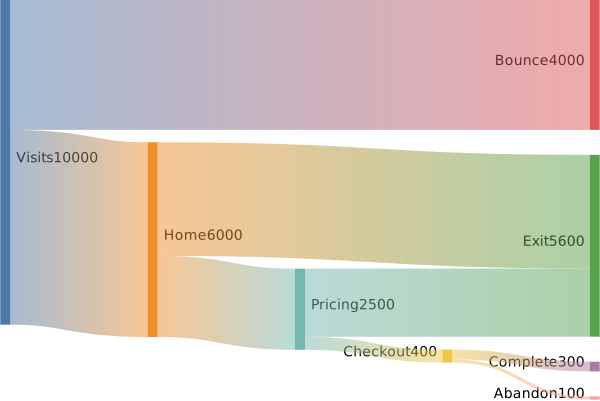
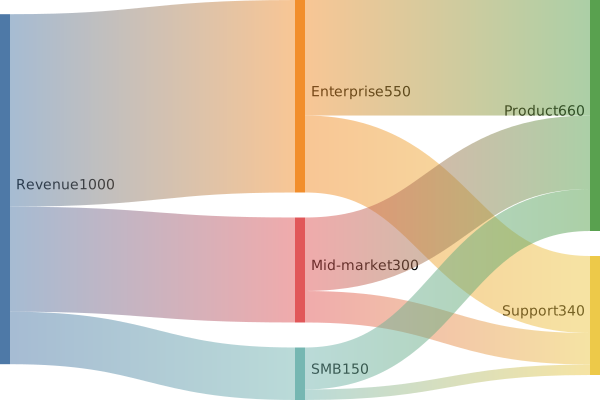
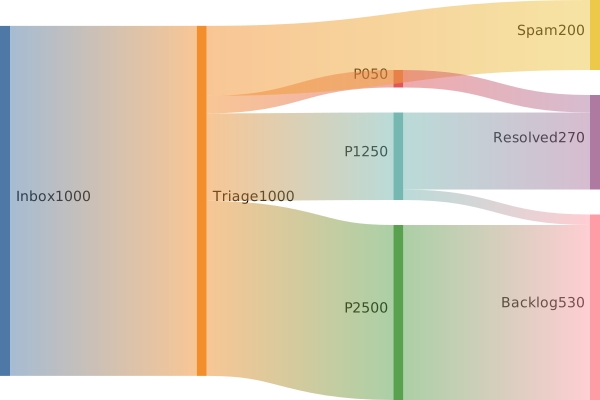
Free Sankey Diagram Maker turns a plain-English description into a Sankey diagram you can export, share, or drop straight into your docs. No drawing tools, no syntax cheat-sheets — just describe what you need and get a clean Mermaid-compatible diagram back.
What is a Sankey diagram?
A Sankey diagram visualises flows of quantity between nodes. Flow width is proportional to the amount moved, so you can see at a glance where the big pipes are and which paths account for most of a total.
Sankey diagrams are the right tool for energy flows, budget allocations, funnel analyses, traffic-source attributions, and any scenario where you want to follow "where did all the X go?" across multiple stages.
Who uses Sankey diagrams?
- Analysts visualising conversion funnels and attribution
- Growth engineers tracing user flow across activation stages
- Finance teams showing budget allocation across departments
- Energy and sustainability analysts modelling energy flows
- Product managers visualising feature-usage and churn paths
- Operations teams tracing materials and process flow
- Consultants presenting value-chain or supply-chain analyses
- Researchers reporting multi-stage data aggregations
Why generate Sankey diagrams with AI?
Sankey diagrams are powerful and a pain to author. The nodes, the links, the exact flow values — producing one in D3.js or Plotly takes non-trivial code, and spreadsheet tools rarely support them well.
Generating a Mermaid Sankey from a plain description ("500 visits total, 300 to home, 150 to pricing...") collapses the overhead to one paragraph of prose. Great for monthly reports, blog posts, and dashboards that need a one-off visual.
How to use the Free Sankey Diagram Maker
- Describe the flows — source node, target node, and the quantity flowing between them — for each link.
- Paste the description into the Free Sankey Diagram Maker prompt box and click Generate.
- Review the rendered diagram; request tweaks like "split Checkout into Success and Failure" or "roll up the small flows into Other".
- Export as SVG, PNG, or Mermaid source for your funnel report, attribution deck, or budget memo.
- Save it so updating with next month's numbers is a five-second regenerate.
FAQ
How many nodes can a Sankey handle?
Mermaid handles a few dozen nodes gracefully. Past that, consider aggregating long-tail nodes into an "Other" bucket — readability drops fast beyond ~20 distinct nodes.
Do the flows need to balance?
Not strictly — you can show loss, drop-off, or unallocated flow by having outflows smaller than inflows at a node. Mermaid renders the imbalance visibly, which is usually what you want.
Can I colour flows by category?
Mermaid Sankey uses the theme palette; per-flow colour customisation requires post-export SVG editing. For rich per-flow styling, consider a D3.js implementation.
Create your own with Free Sankey Diagram Maker — free
Sign up and get 3 AI generations on the house. Export to SVG, PNG, or share a public link.
Related AI diagram tools
Try another free generator from FlowCraft.
- Open tool
AI Sankey Diagram Generator
Create Sankey diagrams from plain English with a free AI Sankey generator. Visualize flows, budgets, and energy data and export as SVG or PNG.
- Open tool
AI Sankey Diagram Maker
AI sankey diagram maker. A Sankey diagram visualises flows of quantity between nodes. Export as SVG, PNG, or Mermaid source.
- Open tool
Online Sankey Diagram Tool
Online sankey diagram tool. A Sankey diagram visualises flows of quantity between nodes. Export as SVG, PNG, or Mermaid source.
- Open tool
AI Class Diagram Generator
Create UML class diagrams from plain English with AI. Free online class diagram generator with Mermaid-compatible output and SVG or PNG export.