AI Git Graph Generator
AI git graph generator. A Git graph visualises a repository's commit history — branches, merges, tags, cherry-picks — as a graph of commits connected by parent…
Sign up free — get 3 AI generations on the house.
Generate with AI — FreeExample outputs
Real diagrams our AI has produced from prompts like this one.
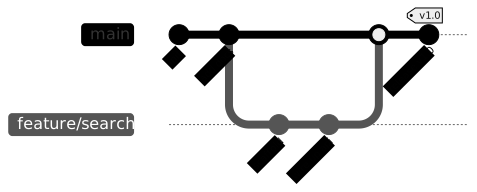
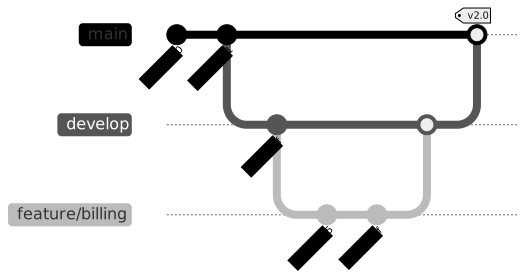
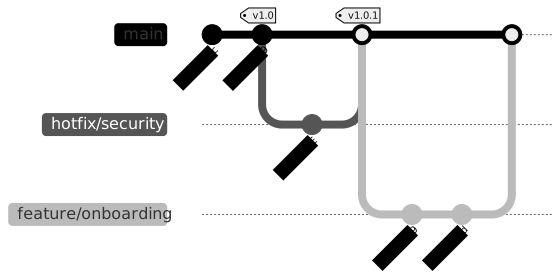
AI Git Graph Generator turns a plain-English description into a Git graph you can export, share, or drop straight into your docs. No drawing tools, no syntax cheat-sheets — just describe what you need and get a clean Mermaid-compatible diagram back.
What is a Git graph?
A Git graph visualises a repository's commit history — branches, merges, tags, cherry-picks — as a graph of commits connected by parent links. Each lane is a branch; each node is a commit. It's the mental model you build when running git log --graph, rendered properly.
Git graphs are invaluable when explaining branching strategies, onboarding a new engineer to a repo's conventions, or showing a tricky merge/rebase scenario in a design doc or blog post. They turn "let me walk you through this" into "here, see for yourself".
Who uses Git graphs?
- Tech leads documenting branching strategies (Gitflow, trunk-based, release branches)
- Engineering managers onboarding new hires to repo conventions
- Technical bloggers explaining Git concepts to a general audience
- Open-source maintainers documenting contribution workflows
- Trainers teaching version control in bootcamps and courses
- DevOps engineers illustrating release and hotfix processes
- Students learning Git for the first time
- Authors writing Git documentation and style guides
Why generate Git graphs with AI?
Mermaid gitGraph syntax is compact but unintuitive — commits, branches, checkouts, and merges each have their own keywords. Writing a realistic-looking branch-and-merge scenario by hand is a fiddly exercise that distracts from what you're actually explaining.
Describing the scenario in plain English ("main has three commits, then we branch off feature, add two commits, and merge back") and letting AI emit the gitGraph source puts the focus back on the concept. Perfect for blog posts, onboarding docs, and internal training.
How to use the AI Git Graph Generator
- Describe the scenario — which branches exist, when they diverged, and how they merged back.
- Paste the description into the AI Git Graph Generator prompt box and click Generate.
- Review the graph; request changes like "add a hotfix branch after the release tag" or "show a cherry-pick from feature to main".
- Export as SVG, PNG, or Mermaid source to drop into your blog post, onboarding doc, or design review.
- Save it so you have a library of common scenarios to pull from for future training or docs.
FAQ
Does it support tags and cherry-picks?
Yes — both are expressible in Mermaid gitGraph. Mention them in the prompt (e.g. "tag v1.0 on main", "cherry-pick fix-abc into release") and the generator emits them.
Can I show a complex Gitflow scenario?
Yes. Describe the scenario in order — develop, feature branches, release branches, hotfixes — and the generator produces a faithful Mermaid rendering.
Is this the same as git log --graph?
Similar idea, different rendering. git log --graph shows the real history of a repo; this tool produces a styled, shareable version of a hypothetical or actual history for teaching and documentation.
Create your own with AI Git Graph Generator — free
Sign up and get 3 AI generations on the house. Export to SVG, PNG, or share a public link.
Related AI diagram tools
Try another free generator from FlowCraft.
- Open tool
AI Git Graph Maker
AI git graph maker. A Git graph visualises a repository's commit history — branches, merges, tags, cherry-picks — as a graph of commits connected by parent…
- Open tool
Free Git Graph Maker
Free git graph maker. A Git graph visualises a repository's commit history — branches, merges, tags, cherry-picks — as a graph of commits connected by parent…
- Open tool
Online Git Graph Tool
Online git graph tool. A Git graph visualises a repository's commit history — branches, merges, tags, cherry-picks — as a graph of commits connected by parent…
- Open tool
AI Class Diagram Generator
Create UML class diagrams from plain English with AI. Free online class diagram generator with Mermaid-compatible output and SVG or PNG export.